Skip to content
View in the app

A better way to browse. Learn more.

Trials Central

A full-screen app on your home screen with push notifications, badges and more.

To install this app on iOS and iPadOS
  1. Tap the Share icon in Safari
  2. Scroll the menu and tap Add to Home Screen.
  3. Tap Add in the top-right corner.
To install this app on Android
  1. Tap the 3-dot menu (⋮) in the top-right corner of the browser.
  2. Tap Add to Home screen or Install app.
  3. Confirm by tapping Install.

Dusk, December Evenings

Featured Replies

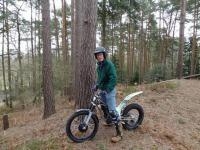
photo-20.jpg

It's not my little pony but the rainbow thing explains why it cost so much!!

  • Author

True... Good tip as I think it has stretched a bit.

Hi To, one othere question, looks like you have 2012 plastics without the graphics, by choice?

  • Author

No, I have a 2011 bike and the nice ssdt graphics but a beginner rider took a tumble of the back and shattered the mudguard and the "saddle". I got this set off the dealer and drilled them myself... No graphics yet but I think it looks nice so I could wait until someone offers me sponsorship!


Join the conversation

You can post now and register later. If you have an account, sign in now to post with your account.

Guest
Reply to this topic...

Account

Navigation

Search

Search

Configure browser push notifications

Chrome (Android)
  1. Tap the lock icon next to the address bar.
  2. Tap Permissions → Notifications.
  3. Adjust your preference.
Chrome (Desktop)
  1. Click the padlock icon in the address bar.
  2. Select Site settings.
  3. Find Notifications and adjust your preference.