


itti olly
Members
-
Joined
-
Last visited
Everything posted by itti olly
-
Many thanks to 2fargone, benbeta125, cvgmmartin and wetfeet for your suggestions. It's very kind of you and much appreciated. All will be investigated and hopefully the party will go with a swing! Cheers and happy trialing
-
<p> Hi Please can anyone help. I am trying to identify the bike in the photo. It was ridden by G Naylor during a trial held somewhere in the Yorkshire Dales during the 1950s. The exhaust looks quite distinctive but as a non motorcycle person I am struggling. My Dad is 85 next week and we are trying to arrange a surprise for the big day. Any help appreciated. Thank you PS Sorry for the cross post - I put it in the wrong section initially Quote MultiQuote Edit
-
Hi Please can anyone help. I am trying to identify the bike in the photo. It was ridden by G Naylor during a trial held somewhere in the Yorkshire Dales during the 1950s. The exhaust looks quite distinctive but as a non motorcycle person I am struggling. My Dad (The dashing young cove in the photo) is 85 next week and we are trying to arrange a surprise for the big day. Any help appreciated. Thank you
-
G Naylor on mystery bike at a trial in Yorkshire between 1950 and 1960
-
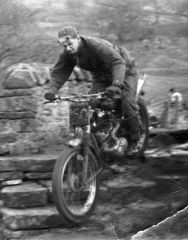
From the album: Can anyone identify this bike?
© Copyright protected - not to be reproduced or published without permission