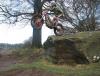
August 4, 200917 yr Try this one out with your friends.... find your favorite "Big Rock" and one at a time you and your friend(s) ride up it. Then each of you take it in turns to get closer and closer to the rock and attempt it from a standing start (balanced). Keep getting closer and closer (until you are very close and moving in inches!) until one of you either crashes or chickens out. allowing 3 attempts makes things a bit easier! I like to call it "trials chicken", give it a go, as daft as it sounds it builds up confidence and its good training. All the best Tom
August 5, 200917 yr We used to play a similar game with a hill climb (doesn't have to be a big hill). Progressively, shorten your run-up by moving forward a stick placed at your front-wheel as a start-point marker (literally throwing down the gauntlet). See who can get the start-stick nearest the peak (or imaginary end flags) of the hill. Tried this at Warden Law once and was pretty chuffed with mesel, then the big boys came along (KSV on TrialsCentral here) and used the stick(in the same place ) as a reference/start point for their back wheel !!! A whole bike length less run-up was a whole world away for me ,skills-wise. But as Brucie says...'Good game, good game..'


Join the conversation
You can post now and register later. If you have an account, sign in now to post with your account.