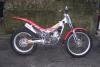
April 13, 200620 yr Does anyone know what the part ref is for the spacers that slide into the holes on the Pinky's front disk, there are 6no. in total. Two of the bolts have been snapped off on mine but the remaining ones are also too long so the disc won't tighten up fully leaving it slightly loose. These maybe home made or just the wrong spacers that someone has found kicking about. If anyone knows where to get them that would be great The manual I have is for TY mono but doesn't have the front disc details on as it is for the drum brake version.
April 13, 200620 yr I believe the disc should be slightly loose i.e. floating (At least the disc on my Pinky is loose). That's probably why you have 2 sheared bolts, because someone has tried to tighten them up too far to try and immobolise the disc. Re the spares angle try Birketts or John Cane.
April 13, 200620 yr Author I have e-mailed John Cane but will try Birketts while he gets back to me. Have you got contact details for birketts, havn't used them before. Cheers
April 13, 200620 yr Author Not sure if the front disc brake setup has one or two pistons to push the pads onto the disc If anyone knows please shout out as I can only seem to get one side to work so I am hoping that there is only one or it would appear I have a problem!


Join the conversation
You can post now and register later. If you have an account, sign in now to post with your account.