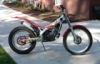
February 11, 200422 yr Why are the 200's so rare in the US? Most people have never seen one. I'm trying to get a test ride on one. A used one that is,,,,
February 11, 200422 yr "Why are the 200's so rare in the US?" MALE EGO!! A 200 is thought of as a girls bike. Not many women or girls compete so you see few 200's 125's are kid's bikes ? At the women nat's couple years ago they(200's) were everywhere. Milt
February 11, 200422 yr I rode a Sherco 200 in the Master Games last year and it could haul my 100kg a*** up the hills ok. Just need the 250 to make up for other inadequacies.
February 14, 200422 yr I think you're probably right (possibly), although the more I think about it, the less I agree Admittedly I ride a 290, but at nearly 18 stone on the Expert route I feel I need it sometimes (even if it's just to give the bike a little easier time). Some of the trouble I think is the fact that not many people go out looking for one, so people are concerned about being able to re-sell it. You can always get rid of a 290, 250 and 125, but the 200 is stuck somewhere in the middle. You'd have to convince someone that they don't need a 250. At the same price though is there any real reason to go for the 200. As we discussed before, if it's all just clutch and throttle control to harness the extra power, why not have it in reserve if you do need it (unless you think the extra power could get you in to trouble).


Join the conversation
You can post now and register later. If you have an account, sign in now to post with your account.