jm_
Members
-
Joined
-
Last visited
Everything posted by jm_
-
Thanks again, Timp. Those mikunis are really bizarre in trials, but work very well in other applications. The mixture screw is located in the rear, with vertical orientation, I suppose? I'm really dangerous fiddling with sensible parts, but can't resist! A search in TC forums has revealed that Betas 4T of previous years came with lean jetting to overcome homologation. Maybe yours also, and Lampkins fixed it in PDI before send your bike. I would pleased to ring Lampkins, but I live in Spain... Cherrs, JM
-
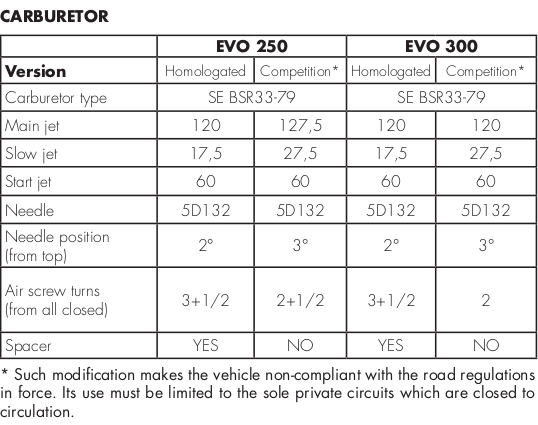
Hi Timp, Thank you for your feedback. Maybe your bike has been modified in the PDI with the 'competition settings'? By the way, is it yours a 2016? Cheers, JM
-
Hi all, I'm a lucky guy that will throw a leg over a new Beta Evo 250 4T in few days. I came across this information about carb settings I understand that homologation requirements are on the lean side and the bike should run with the competition settings. I have a pair of questions: - What means 'spacer'? In what part of the carb is located? - Are you, beta 4T users, in agreement with the recommended settings? - Are the needed jets supplied in the crate? Well, three of them. Sorry... I hope to share with you my new Beta-times. Cheers, JM