November 9, 200817 yr Hi Folks, Hope you don't get tired of me asking these questions. The Bultaco deal fell through. Can someone tell me the difference between a 1972 Ossa MAR and a 1973 Ossa Explorer. They look the same. Are frame geometry, motor and gearing similar to the MAR. Would the 73 Explorer make a good trials bike. And if so, what would I need to change other than tank, seat and sprockets. Thanks folks, Gordon
November 10, 200817 yr I am quite certain that the seat and tank and maybe gearing are the only differences. I have a 72 Ossa and I have seen a number of Explorers and I think that is about it.
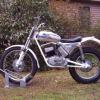
November 10, 200817 yr The Explorer is an easy conversion unless you want the same wheelbase as the Mk1 MAR. The Explorer is based on the Mk2 MAR which has a longer swingarm than the Mk1 MAR so if you want the short wheelbase you will need to shorten the Explorer arm or get a MK 1 swingarm. If you fit a shorter swingarm to the Explorer, the bottom mudguard mount needs to me modified to provide rear tyre clearance. My OSSA trials bike is based on an Explorer and has been fitted with a redecorated MAR tank, MAR seat and a MK1 MAR swingarm. It is great to ride. The photo was taken yesterday at a trial.


Join the conversation
You can post now and register later. If you have an account, sign in now to post with your account.