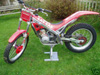
November 4, 200421 yr I am thinking of putting lights on my bike... What do i need to do this? I dont need it road legal, just a 'sidelight' front an back would do. Do i need a battery for this? or is there another way? As it is, there is no wiring for lights. After original style Supertrial, tr35 or even tr34 lights, can anyone help?
November 8, 200421 yr Author Why?...... Although i don't ride my bike on the road, i have to use some privately owned lanes to get to where i ride. These lanes are used by the owners, farmers and other works vehicles. With the earlier nights, and weather getting worse, wanted some lights so easier to be seen, also owners don't want to get into 'crossers' using their land, so if my bike looks road legal, they are a lot happier...... Now..... Can anyone tell me how i can fit lights? Also - any recommendatios for aftermarket lights, if i cant find/too dear originals?
November 9, 200421 yr If you just want lights to be seen you can use battary powerd bicycle lights I dont know how well you will be seen though
November 10, 200421 yr Halogen mountain bike lights are amazing, way brighter than anything you would be able to hard wire in. Come with rechargable batt. and doddle to fit. I fitted lights to an older trials bike years back and it took to much juice from it and the bike ran like crap with them switched on. I would go for the mtn. bike ones.


Join the conversation
You can post now and register later. If you have an account, sign in now to post with your account.