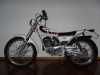
January 27, 201115 yr Haynes manual says to remove packing (fibreglass) and 'discard'. Any thoughts? Will I have to re-jet the carb? I have removed the oil pump from my competition machine. Haynes manual says I (may) have to increase the jet sizes 5 to 10% "to allow for passage of the oil, or the engine will be running weak at all throttle openings". Chapter 2, section 12.9. Probably going to run synth @ 50:1. I find this doubtful, any thoughts? Jonny.
January 28, 201115 yr Couple of thoughts: If you still have the original packing in the muffler it is so gummed up your bike hasn't been running correctly for quite some time. Once removed ride it for a time before you change anything. If you remove the oil pump make sure you block off the holes completely or you will create an air leak. As with the muffler I would ride the bike for a time prior to changing anything. My guess is that you will find you will not need to change anything.
January 28, 201115 yr Author Thanks again Alan, I have already plugged the oil feed to the carb. The bike is stripped down and the frame is off to the powder coaters next week, and I am aiming to have the bike back in one piece in about a month. Jonny.


Join the conversation
You can post now and register later. If you have an account, sign in now to post with your account.