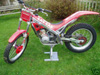
March 12, 200521 yr I've just abandoned the BETA ship, and jumped aboard the GasGas vessel! Have just bought a 1995 250 Contact - Yes, its 10 years old, an oldie.... but a goodie! have noticed on quite a few, the little computer doesnt work. have replaced the battery on mine, as it too didnt work, and its all on, but the wires on the back arent connected. i know its pretty useless, but its there, so it'd be nice for it to work. any ideas where the wires go? its very similar to the computers you get for bicyles, which, i seem to remember have a little magnet on the spokes to register the speed, there isnt anything on this one. if no joy, at least the clock works on it! cheers for any help, am sure will be posting more q's!!!
March 12, 200521 yr cant help you apart from that they may possibly be a wire running alog the swingarm to the wheel? riding the camel vale good friday trial. if so should see you there very scratched 2002 beta with homemade number board and me wearing a red hebo helmet. Edited March 12, 200521 yr by J@mes
March 12, 200521 yr The little magnet isnt attached to the spokes on this model its screwed into the hub on the disc side of the rear wheel inside of the brake disc an its got around 8mm hex head and the reciver bolts onto the brake caliper bracket. Your lucky the clock still works my hole unit gave up working atfter around 2 years.
March 12, 200521 yr Author Thanks. have bought an owners manual from an internet auction site called ebay.... anyone heard of it?? hopefully will have details in there.


Join the conversation
You can post now and register later. If you have an account, sign in now to post with your account.