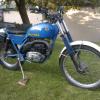
March 13, 201313 yr hi currently running my ty175 at 50-1 on good quality castrol 2t fully synthetic oil just think it smokes a bit to much been reading forums and people are saying anything from 50-1 to 100-1 with a good quality full synthetic 2t oil. any suggestions of a good ratio mix bike only rode off road any help greatly appreciated as neighbours dont like the smoke would it be ok at 70-1 with castrol fully synthetic oil cheers guys Edited March 13, 201313 yr by davdeborg
March 13, 201313 yr Author the oil im useing is castrol power 1 2t fully synthetic ta Edited March 13, 201313 yr by davdeborg
March 13, 201313 yr I run the same oil and also at 50/1 and it does not smoke a lot. Have you clean out the exhust? I found that mine smoked a lot with the old exhust until I burned it out. just a guess
March 13, 201313 yr Author no not cleaned it out do you mean whole exhaust or just tail pipe what did you clean it out with ? or how did you clean it out ? thanks
March 13, 201313 yr try giving it a bit of a thrashing that should clean it out well enough see if it smokes less after that
March 13, 201313 yr Hi I mean the whole exhust. i started a fire in a big steel drum and put the exhust in the fire and let it burn overnight. Do not try it this way if it's alum. If you get the exhust good and hot like after a long long ride and it still smokes after you shut the motor off then it's oil build up in the exhust.
March 28, 201313 yr Author cleaned whole exhaust soaked it for five hours in a red hot caustic bath all clean now no excessive smoke its perrrrrrrrrrrrfect also cleaned the insulation in tail pipe as it was dripping in oil so all sorted cheers


Join the conversation
You can post now and register later. If you have an account, sign in now to post with your account.