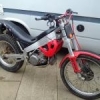
August 14, 201313 yr My Montesa 314r doesnt have a kill switch, so i have to stall it or block the exhaust to kill the engine. I was checking the water level and noticed two wires taped up, so i took the tape off and one wire was green and one black with plugs on the end then i noticed another wire taped up which had a black wire and a green wire with a t connector thing on the end so i presume one is for the kill switch, but which one? I've attached some pictures of the wires. thanks
August 14, 201313 yr Hi.. I wouldn't personally recommend riding without a kill switch. I would think that you can download a wiring diagram, just do a search. Those two wires joined together are a bit strange, Is your fan running all the time the engine is on? TLTEL
August 14, 201313 yr Author Hi, Sorry i don't know why i called it a kill start i meant kill switch, sometimes the fan comes on but sometimes it doesn't and i have to flick it to get it running, so could one be for a thermostat? thanks
August 14, 201313 yr Author Hi thanks for the link, i looked at the wiring diagram and there are two wires coming off the ignition control module that are green and black/white like the two in the first picture then they lead to a kill switch so i think thats the right one? thanks


Join the conversation
You can post now and register later. If you have an account, sign in now to post with your account.