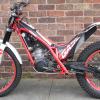
December 4, 201312 yr Author i thought i would start where i left off, 30 years ago, how wrong was I, it's back to basics for me, i can't agree with you more about using one finger for the clutch and front break, after about ten seconds of riding yesterday, i pulled back on the throttle just a tad to much and off it went, front wheel in the air and i was just about to fall backwards and i managed to pul the clutch in but i nearly ended up flipping it, i had a idea in my head what i was going to do when i got the bike but that as changed now completely, in fact i am not planning anything now i will just go with flow and take my time, my only plan is to try and make it to my first trial meeting around april-may, that should give me plenty of time to get the more basic things down, thanks for the advice, i'm glad i came across the site, it's already been a great help. regards Tony


Join the conversation
You can post now and register later. If you have an account, sign in now to post with your account.