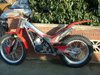
September 19, 200521 yr Does anybody have any ideas on how to remove staining from a ty250 pinky petrol tank? Any advice greatly appreciated.
September 20, 200521 yr You're probably talking about that yellow/brown that's the color of a hard-drinking secretary's teeth. It comes from the inside and seeps through the plastic. As far as I know, there's nothing you can do about it.
September 20, 200521 yr i think on my old ty250 pinky i used something like cream cleaner and alot of elbow grease. James
September 21, 200521 yr Try putting it through the dishwasher with two tabs. Dont try to paint it coz it just bubbles up. Like the man says the fuel permeates through from the inside, there is no coating available that sticks to oil, petrol and polyeurethane, trust me, I tried it, what a bloody mess. May I suggest buying a tank cover or a metal tank if you want it to look pretty?
September 21, 200521 yr I used Jif (or is it Cif now ) which cleaned it up a little but you'll never get it back to the original white colour. I cleaned and re-painted the frame a gleaming white colour and the tank looked worse than ever. Paint the frame a dirty cream colour and your tank will look like new Edited September 21, 200521 yr by wobbly1


Join the conversation
You can post now and register later. If you have an account, sign in now to post with your account.