Skip to content
View in the app

A better way to browse. Learn more.

Trials Central

A full-screen app on your home screen with push notifications, badges and more.

To install this app on iOS and iPadOS
  1. Tap the Share icon in Safari
  2. Scroll the menu and tap Add to Home Screen.
  3. Tap Add in the top-right corner.
To install this app on Android
  1. Tap the 3-dot menu (⋮) in the top-right corner of the browser.
  2. Tap Add to Home screen or Install app.
  3. Confirm by tapping Install.

Hi There

Featured Replies

Hi


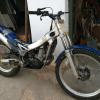
I am joining up after buying a 2001 Beta 250 last week.  I am busy reading the Beta thread, but might ask some questions as I get stuck.


I am 20+ hours into my project, with some niggles remaining.


Trials is awesome.  I ride trails with a WR450, but the trials bug has bitten.  I even thought I could ride before. ;)


Welcome  Katana

Enjoy it's a great place for info ect,  and you come from a very nice place in the world

Hi Katana! 


Trials is ace and your skill will defiantly improve and cross over to your trail riding. 

I've done a few UK Rallys now and the odd enduro but you can tell when these skills come in!  


We are always learning but the main thing is we are all having fun at whatever level we're at. :thumbup:  


Rich 


Tubby Trial Team

Join the conversation

You can post now and register later. If you have an account, sign in now to post with your account.

Guest
Reply to this topic...

Account

Navigation

Search

Search

Configure browser push notifications

Chrome (Android)
  1. Tap the lock icon next to the address bar.
  2. Tap Permissions → Notifications.
  3. Adjust your preference.
Chrome (Desktop)
  1. Click the padlock icon in the address bar.
  2. Select Site settings.
  3. Find Notifications and adjust your preference.