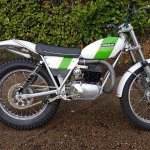
November 4, 20169 yr Hi all My bike is ready to be registered with the DVLA - but where can I get an approved DVLA dating certificate from? There doesn't seem to be anyone or any company that I can find who'll do this. Mines a 1977 TR77. Thanks Adrian
November 4, 20169 yr Read the details on here, loads & loads of posts on how to register a trials bike. Use the VMCC (Vintage Motor Cycle Club) for a dating letter / certificate. Best if not yet done a Trade HPI check by frame number at a local car or bike dealer (Not the internet ones) to see if the bike had been registered before then only £25.00 for a replacement V5C for it's old number plate and no dating letter required. This will also check if stolen or finance outstanding! http://www.trialscentral.com/forums/topic/54839-road-registering-guide/ & http://www.vmcc.net/aboutus/library/DVLA.aspx Edited November 5, 20169 yr by gasserguy
November 4, 20169 yr Author OK, thanks for that. I've done a lot of the groundwork, but need a dating form. I'll try the VMCC as suggested. :-)
November 4, 20169 yr If they don't have all the details on your bike they will accept your research and data to help and compile data for there library. Very helpful people. I think they charge £27.00 and they are DVLA approved.


Join the conversation
You can post now and register later. If you have an account, sign in now to post with your account.