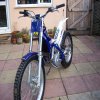
February 25, 200620 yr Author Went to look at a Scorpa today, sounded perfect, but unfortunately i had to walk away, it had just a few too many dents/chafe marks on it for me, and i personally thought the engine was slightly rattley its probably just me being pickey, i have a rattley engine phobia. I feel really sad now as i still dont have a bike, i just hope another one comes up soon, the only second hand Scorpas like i want ive seen in dealerships, which are just a little too pricey. Iam becoming tempted to start looking at Betas to open my options a little bit, i cant stand not having a bike, even though ive only missed one (soon to be two ) events. Edited February 25, 200620 yr by Nitjay - HRC
February 25, 200620 yr im thinking about a scorpa aswell (i have a beta) and they feel very similar so if i sell mine i dont know which to get. Its your money your spending so be picky you want something to last!!!!


Join the conversation
You can post now and register later. If you have an account, sign in now to post with your account.