Skip to content
View in the app

A better way to browse. Learn more.

Trials Central

A full-screen app on your home screen with push notifications, badges and more.

To install this app on iOS and iPadOS
  1. Tap the Share icon in Safari
  2. Scroll the menu and tap Add to Home Screen.
  3. Tap Add in the top-right corner.
To install this app on Android
  1. Tap the 3-dot menu (⋮) in the top-right corner of the browser.
  2. Tap Add to Home screen or Install app.
  3. Confirm by tapping Install.

Newbie alert!

Featured Replies

Hi all, a few mates of mine ride trials and have been badgering me to have a go, so I bit the bullet and went along and had a go and loved it! A week later I joined a club, got my acu license and bought a bike! I haven’t spent a fortune just in case I decide I don’t want to do it(can’t see that happening) so I might be asking a few questions as I pick it up if you all don’t mind, I don’t want to be annoying asking stupid questions. 
 

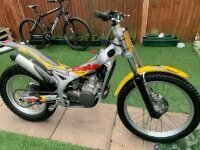
I’ll try and put a picture up of my 20 year old beta(be gentle on her) and let you know how my journey goes! 
 

cheers, Martin. 328E88E3-5434-4654-B169-214E003D78BA.thumb.jpeg.2bc5bd307ce437c5cb64ce45fd0f5592.jpeg

Welcome to the trials club, lol ... I hope you have lots of fun - that looks like a nice clean example you've got there, the Rev 3 is a good solid bike :)

Join the conversation

You can post now and register later. If you have an account, sign in now to post with your account.

Guest
Reply to this topic...

Account

Navigation

Search

Search

Configure browser push notifications

Chrome (Android)
  1. Tap the lock icon next to the address bar.
  2. Tap Permissions → Notifications.
  3. Adjust your preference.
Chrome (Desktop)
  1. Click the padlock icon in the address bar.
  2. Select Site settings.
  3. Find Notifications and adjust your preference.