

Skip to content
View in the app

A better way to browse. Learn more.

Trials Central

A full-screen app on your home screen with push notifications, badges and more.

To install this app on iOS and iPadOS
  1. Tap the Share icon in Safari
  2. Scroll the menu and tap Add to Home Screen.
  3. Tap Add in the top-right corner.
To install this app on Android
  1. Tap the 3-dot menu (⋮) in the top-right corner of the browser.
  2. Tap Add to Home screen or Install app.
  3. Confirm by tapping Install.

fingers

Members
  • Joined

  • Last visited

Everything posted by fingers

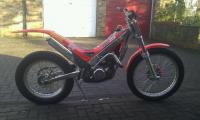
  1. hi can anyone help bought a jtx 250 couple of weeks back speedo wasn't working so pulled it apart replaced dead battery etc but the lead had already been unplugged and i cannot find were to reconnect looked all over but no joy
  2. fingers replied to fingers's topic in Introduce Yourself
    nice one thanks gents will have a look at that over the holidays
  3. fingers replied to fingers's topic in Introduce Yourself
    thanks colinf that would be much appreciated
  4. fingers posted a topic in Introduce Yourself
    Hi new to trials done most things on two wheels but always with to much speed so thought id have a go at slowing it down a bit . im in essex and hoping to ride poles wood as soon as my application comes back got my self a gas gas jtx250 97 but very tidy one little quibble the stop clock did not work had a butchers this afternoon only to find it not plugged in lol i have looked all over cannot find were it plugs in any ideas ?
Account

Navigation

Search

Search

Configure browser push notifications

Chrome (Android)
  1. Tap the lock icon next to the address bar.
  2. Tap Permissions → Notifications.
  3. Adjust your preference.
Chrome (Desktop)
  1. Click the padlock icon in the address bar.
  2. Select Site settings.
  3. Find Notifications and adjust your preference.