


Skip to content
View in the app

A better way to browse. Learn more.

Trials Central

A full-screen app on your home screen with push notifications, badges and more.

To install this app on iOS and iPadOS
  1. Tap the Share icon in Safari
  2. Scroll the menu and tap Add to Home Screen.
  3. Tap Add in the top-right corner.
To install this app on Android
  1. Tap the 3-dot menu (⋮) in the top-right corner of the browser.
  2. Tap Add to Home screen or Install app.
  3. Confirm by tapping Install.

lukefrans85

Members
  • Joined

  • Last visited

  1. fair comment buddy
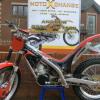
  2. hello ive just bought my Gas Gas 280 pro on a 04 which is all up together apart from the decals on tank are a little faded and want to replace full decal kit !! well doing this i thought the bike would look mint with new front and rear mudguards to finish it off can any 1 advise me where i could get front and rear in red from at resonable price any help would be great as im struggling ! thanks alot luke
Account

Navigation

Search

Search

Configure browser push notifications

Chrome (Android)
  1. Tap the lock icon next to the address bar.
  2. Tap Permissions → Notifications.
  3. Adjust your preference.
Chrome (Desktop)
  1. Click the padlock icon in the address bar.
  2. Select Site settings.
  3. Find Notifications and adjust your preference.