gtmuzz
Members
-
Joined
-
Last visited
Everything posted by gtmuzz
-
Im not saying you should do this... but I personally, spray deodorant inside the tyre. not to much! Then use a lighter near the bead. and pop its on! You must pump up the tyre straight away...
-
The Academy is pritty sweet, So much obstacles that suit a wide variety of skill levels which has helped me alot in working my way up That was genuinely my first day trying motorized trials, I've rode mountain bikes and pedal 20" wheeled trials bikes before this only, this is the first motorbike I've ever been on as well, so getting used to the clutch and the back brake has been interesting
-
Thanks very much Got a long way to go before i feel perfectly comfortable on it to try bigger things but i'm having fun so far!
-
Alryt guys, Just joined the forum, got my first trials bike last week. 2010 gasgas 250. Im not very clued up on motorized bikes, used to the pedal variety ha! Hopefully ill learn a few things from here Cheers!
-
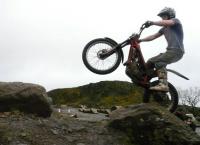
Got my first bike 1 week ago and this was at the end of my first day of giving trials a go filmed at the Bob MacGregor trials academy Nothing special but thought id share