

Skip to content
View in the app

A better way to browse. Learn more.

Trials Central

A full-screen app on your home screen with push notifications, badges and more.

To install this app on iOS and iPadOS
  1. Tap the Share icon in Safari
  2. Scroll the menu and tap Add to Home Screen.
  3. Tap Add in the top-right corner.
To install this app on Android
  1. Tap the 3-dot menu (⋮) in the top-right corner of the browser.
  2. Tap Add to Home screen or Install app.
  3. Confirm by tapping Install.

timppa

Members
  • Joined

  • Last visited

Everything posted by timppa

  1. timppa replied to taffe's topic in Beta
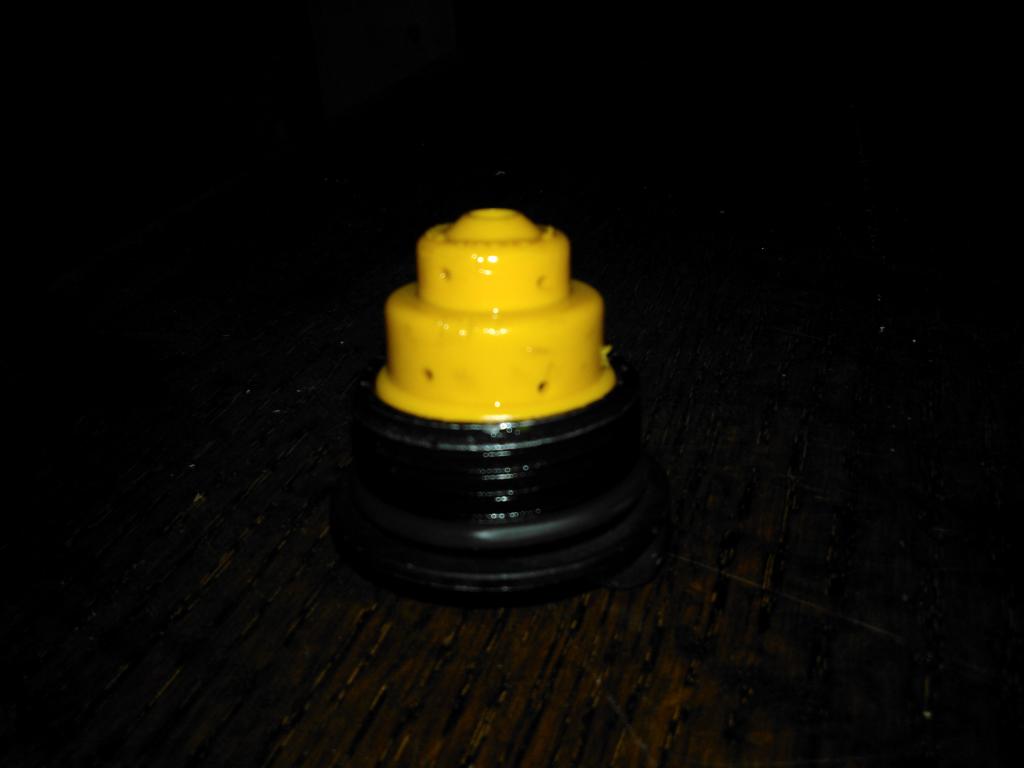
    Had the same problem in some of my previous Beta's and in current one. Earlier one was cured with longer breather hose re-routed. Current one was a bit trickier. I tried re-routing the longer hose, different versions, no succes. Then I tried without the yellow plastic part on the cap etc, even worse. Then I tried to understand what the cap is trying to do, I guess the spring actuated thing should be some kind of valve but it wasn't working right. Then I just drilled some small (1-1.5mm) holes around the plastic part, to act as a vent holes as the fuel seemed to be held in the cap by the valve thing and when it's full, it starts to spill out. Works fine, doesnt spill fuel anymore.
Account

Navigation

Search

Search

Configure browser push notifications

Chrome (Android)
  1. Tap the lock icon next to the address bar.
  2. Tap Permissions → Notifications.
  3. Adjust your preference.
Chrome (Desktop)
  1. Click the padlock icon in the address bar.
  2. Select Site settings.
  3. Find Notifications and adjust your preference.
