

Skip to content
View in the app

A better way to browse. Learn more.

Trials Central

A full-screen app on your home screen with push notifications, badges and more.

To install this app on iOS and iPadOS
  1. Tap the Share icon in Safari
  2. Scroll the menu and tap Add to Home Screen.
  3. Tap Add in the top-right corner.
To install this app on Android
  1. Tap the 3-dot menu (⋮) in the top-right corner of the browser.
  2. Tap Add to Home screen or Install app.
  3. Confirm by tapping Install.

Scott McCrory

Members
  • Joined

  • Last visited

Everything posted by Scott McCrory

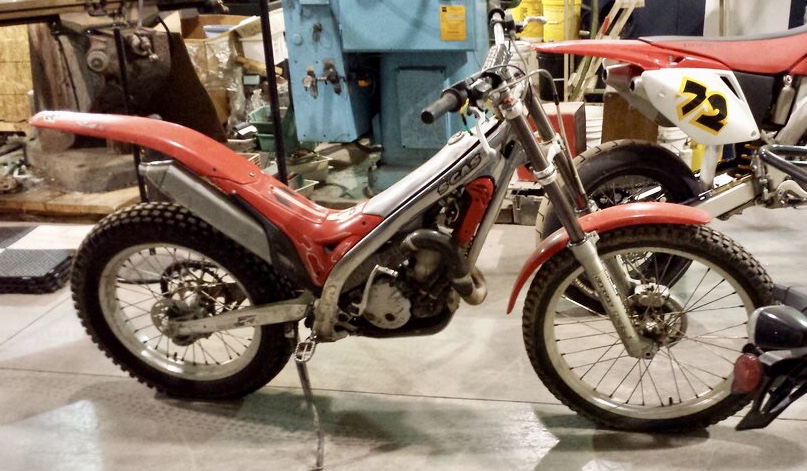
  1. Hi Mark, I'm a trials beginner, having picked up a 2003 GG TXT 280 Pro a couple weeks ago to compliment the woods riding I do on a Beta 350. I live in Westerville and would definitely like to connect with others in the area.
  2. At risk of being called a thread grave digger :-) I just bought my first Trials bike yesterday - a well-used 2003 GasGas TXT 280 Pro. And thus begins the rabbit hole...!

Account

Navigation

Search

Search

Configure browser push notifications

Chrome (Android)
  1. Tap the lock icon next to the address bar.
  2. Tap Permissions → Notifications.
  3. Adjust your preference.
Chrome (Desktop)
  1. Click the padlock icon in the address bar.
  2. Select Site settings.
  3. Find Notifications and adjust your preference.