December 22, 200718 yr Ok here we go with another dumb ? about the ty80 that the answer to should be in the shop manual I just got but it refers me to a old dt 250 manual thinking I'm in a yamaha dealer !How do I separate the fork tubes from the sliders so I can install the new seals I'm holding in my hand ... All I have is a sketchy exploded veiw of the forks ! And I want to know if I need any special tools that are not already at hand ? Thanks for your patience ... Glenn
December 23, 200718 yr Hi,as per Haynes manual,drain fork oil,remove dust cover,and on late models only withdraw the circlip and plain washer from the top of the lower leg,above the oil seal.clamp the lower leg,push the stanchion in and withdraw it sharply,like a slide hammer action.On early models identified by a chrome plated seal holder at the top of each leg,unscrew the seal holder,then remove the stanchion as above. ps. I have missed some bits out but thought you would get the idea.never done it on ty80,so if you need more info I will consult the manaul.
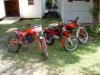
December 24, 200718 yr Author Thanks I'll figure it out ! and here is the 1st photo of the resto/hotrod to be , as purchased...


Join the conversation
You can post now and register later. If you have an account, sign in now to post with your account.