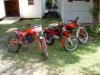
April 7, 200917 yr I just received my Fantic 20 x 20 in a box and put it together and rode it ...(Kinda ) A few questions to you bicycle folks , 1 , who's signature is that on my bike ? 2 ; what year were these made ? 3 ; How much harder is it gonna be to ride when I put the 28 tooth stock front sprocket on to replace the 40 tooth one that was adapted ? I feel really old right now ... And were all the early bikes tanks like this one ? Thanks , I'm now a 3 Fantic Family , A 240 , a 50 , and now a 20x20? Glenn
April 7, 200917 yr Jean Pierre Goy (i think) will ask my dad what year i had mine. I've got a pictue somewhere of me on my Fantic Trialsmaster at the SSDT but can't remember them being called 20 x 20 at any point. It should be loads better when its back to standard. When i started riding for Monty i really struggled and missed the Fantic, weighed a ton but i'd spent many hours on it. Looks nice, I'm always looking for one myself as its about the only bike i've rode that i don't have one of.
April 7, 200917 yr Thanks , now I at least know the name of it !!! That confused me, read the topic in the fantic topic and was sure i'd replied Have posted a photo of mine now at the ssdt. If you ever get rid of it let me know
April 9, 200917 yr sorry, i cant answer any of your questions buy that famtic brings back memories of my old fantic 240 pro that i used to ride. edit: not really easy to find info on fantics on the web. Edited April 9, 200917 yr by redneck


Join the conversation
You can post now and register later. If you have an account, sign in now to post with your account.