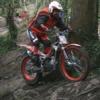
May 4, 200917 yr One for Team Fantic and any other owners, I've been looking through some of my bikes documents (paperwork) when i bought my bike last year and came across a large amount of Fantic gumf. Have a look at the pictures theres so much stuff it may appear a little small but you may be able to make some of the stuff out. The key bits and bobs are; I've got post cards of Gilles Burgat (world champion 1981), Jean-Pierre Goy air turning a 200cc and British rider Steve Monk riding the 240pro. I've also got stickers and sow on Fantic badges. Looking through the ACU 1983 compliment Fantic hand book i see riders of: Tony Scarlett, senior trials champion riding a Fantic, Andrew Clinkard, intermediate champion riding possible a yamaha. Darren Snell, junior champion riding a yamaha 80. The best bit is the Fantic plastic carrier bag....lol just trying up find the upload pictures bit anyone?....... Edited May 4, 200917 yr by spud
May 4, 200917 yr Hi Cliff, register on photobucket or similat and load the piccies there. Then copy the bottom hot link and there you go Lee
May 4, 200917 yr Hi Cliff, register on photobucket or similat and load the piccies there. Then copy the bottom hot link and there you go Lee
May 4, 200917 yr Author Clicky: http://s406.photobucket.com/albums/pp147/s...amfantic001.jpg Clicky: http://s406.photobucket.com/albums/pp147/s...amfantic002.jpg
May 4, 200917 yr Clicky: http://s406.photobucket.com/albums/pp147/s...amfantic001.jpgClicky: http://s406.photobucket.com/albums/pp147/s...amfantic002.jpg Edited May 4, 200917 yr by Lee Harris


Join the conversation
You can post now and register later. If you have an account, sign in now to post with your account.