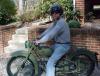
May 24, 200917 yr Have to put in a note about the '74, TY250. Rode a 32 section Trial this weekend. Both modern and vintage bikes. The TY never missed a beat. Started 1st kick every time. Used all 5 gears as it was quite a distance between a couple of sections, no shifting issues. Had plenty of power for all the climbs, brakes worked well on the downhills. In the hands of a good rider I can see where this could be a very competitive machine. Alan Edited May 24, 200917 yr by Alan_nc
May 26, 200917 yr That sounds very good,as swoosdave said,you must have done a lot of work since last time.Myself had a rubbish day on the 250 TY on the Classictrial in Italy(Campo Canavese)two weeks ago.In the first section of the saturdy i fall into a very deep cold stream an was fully wet.Good thing was that it was bright sunny and hot.Next 4 sections also 5,then i found my confidence back.But too late.For me it was one of these days you better stayed in the bed.On the sunday i had a fine ride and came out 10th of 27.Sat it was 16th of 20th.So you see these things can happen to everybody,even on a good Ty 250 Twinshock. Chrs:Mike
May 26, 200917 yr Dave,Bike ran great.... Thad still beat me on the old montesa. Alan Thad's a pretty good rider. And that 123 is the tits. Tough combo.


Join the conversation
You can post now and register later. If you have an account, sign in now to post with your account.