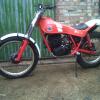
January 29, 201115 yr Author Hi there, just wondering where the frame number is on your MH as I have an identical bike and cannot find an number anywhere on mine. Much appreciated. Nick. The number is on the headstock as well as a VIN plate rivited onto the headstock with the model number and serial number on it. Also the engine number should be the same as the frame number, my bike had had its frame number stamped onto the frame after it was painted when new which suggests Montesa fitted the engine in the factory and then numbered the frame to match. I had this bike new from sandifards in 86 so its not been interfeared with.
January 30, 201115 yr The number is on the headstock as well as a VIN plate rivited onto the headstock with the model number and serial number on it. Also the engine number should be the same as the frame number, my bike had had its frame number stamped onto the frame after it was painted when new which suggests Montesa fitted the engine in the factory and then numbered the frame to match. I had this bike new from sandifards in 86 so its not been interfeared with. Yes I thought it should be there but theres nothing and no remains of rivvit holes etc. My engine number says it is a MH349 but if I decide I want to road reg it I will be a bit stumped. Thanks anyway. Nick
January 30, 201115 yr Author Yes I thought it should be there but theres nothing and no remains of rivvit holes etc. My engine number says it is a MH349 but if I decide I want to road reg it I will be a bit stumped. Thanks anyway. Nick Punch the engine number onto the head stock with a star at the start and the end and hope the thing is not pinched.


Join the conversation
You can post now and register later. If you have an account, sign in now to post with your account.