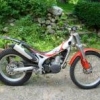
September 7, 201214 yr Hi All, I'm new to trials. I'm coming from trail riding and dual sport. I have had (over the past 30+ years) an old honda 360 scrambler, a suzuki GS550L, a honda XL650R, a honda Hurricane 600, a Hurricane 1000, a VFR700 and currently I have an '89 honda transalp that has been everywhere from highway to logging trails. It is a most excellent all-around bike. Also have a TTR-250 for playing in smaller trails, an NX250 (little brother to TA), a honda fourtrax quad and my "new" 2001 Beta Rev3. I'm 50 years old and am fascinated by trials. I bought my Beta and started by standing on the pegs (engine off) and balancing in place. I've done 30 minutes at a time. Next I've been working on riding as slow as I can go - beginning to stop, hold my place, then go again. Also starting to do figure eights, smaller and smaller. I've managed to get this done in a few hours here and there so think maybe I have enough natural talent to get somewhere with this... if only to make my trail riding more skillful. So, hello everyone - I'll be asking questions!
September 22, 201214 yr Author Thanks! And btw, I'm a girl. Old girl maybe, but I refuse to grow up :-)


Join the conversation
You can post now and register later. If you have an account, sign in now to post with your account.