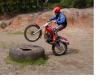
May 19, 200521 yr What do ya reckon my bike will fetch on ebay thinking of maybe upgrading to a scorpa. James
May 20, 200521 yr James, Stick it on with a big reserve and a right to withdraw, gives you a couple of opt outs. That way you'll see what's on offer. I've been offered 2K for my 250 and it's not the best around, will be lots better when it's finished but some of the prices are rediculous dy
May 20, 200521 yr thinking of maybe upgrading to a scorpa. Isnt that a contradiction in terms - upgrading to a Scorpa? Remember the Scorpa value will drop while the Honda will rise. But if you must sell prices do tend to be quite high at the moment - big reserve of
May 20, 200521 yr Author nah i do like it tho, its just i did really want a scorpa 125 and now i have managed to save up a fair bit more money so i can afford one I think the engine sounds fine james
May 22, 200521 yr Hey you don't hang about do you? If you send me an e-mail with what you want for the TLR I will see what I can do. (Trying to beat Honda RS along the coast from Southampton might prove tricky though). spout@westcoastsurf.co.uk Edited May 22, 200521 yr by spout
June 3, 200521 yr Author we will soon see......... http://cgi.ebay.co.uk/ws/eBayISAPI.dll?Vie...item=4554362710 James
June 6, 200521 yr Author dont p*** me off lol i was pretty happy with that anyway. besides i got the scorp pretty cheap james


Join the conversation
You can post now and register later. If you have an account, sign in now to post with your account.