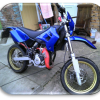
November 23, 201312 yr I want to fit a 12v battery to my sherco hrd 50. Mainly because the indicators and lights are quite dim on tickover. This can be scary when waiting at road junctions. The bike is the 2003 sm and at present does not have a battery or charging circuit. Any help would be much appreciated .Thankyou.
November 23, 201312 yr not easy.it will need new generator that wont be available for this bike,so a custom one will need to be made and regulator plus wireing.the lights will still be dim as they will be run direct from generator so will go up and down with revs.best bet is total loss battery using sealed for life battery so can be fitted on its side or right way up.the battery then can run,indicators,horn,brake light.then it will need charging with correct charger every night.
November 24, 201312 yr As these systems are very basic, a couple of thoughts here: The system prolly has a rectifier and regulator already if you can find a diagram on it. You may be able to stabize the system simply by tying in a 8 cell AA pack into the light circuit using rechargeable ni-cd or lithium cells. Other thought, being a lot of specific lamps are available now in LED which use little of available power. Some are quite bright, but they do require stable DC power. Many available on fleabay.
November 24, 201312 yr Author Many thanks, bike has a regulator rectifier, just wondered if i could introduce a battery to make lights and indicators more stable. Thanks for help.


Join the conversation
You can post now and register later. If you have an account, sign in now to post with your account.