Skip to content
View in the app

A better way to browse. Learn more.

Trials Central

A full-screen app on your home screen with push notifications, badges and more.

To install this app on iOS and iPadOS
  1. Tap the Share icon in Safari
  2. Scroll the menu and tap Add to Home Screen.
  3. Tap Add in the top-right corner.
To install this app on Android
  1. Tap the 3-dot menu (⋮) in the top-right corner of the browser.
  2. Tap Add to Home screen or Install app.
  3. Confirm by tapping Install.

Greetings From Mexico

Featured Replies

Hello everyone

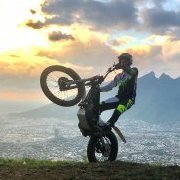
My name is Roberto and I´m from Mexico, I just bought a 2007 Sherco 2.9 2-stroke and I am new to trial bikes so I hope I can learn a lot from you guys as much as I am willing to be useful myself!

I have some experience in motocross, enduro and road bikes. And with trial biking I want to take my skills to the next level!

Thank you!

Welcome! You have a lot of mountains there to play on according to google maps. Hope you enjoy the sport!

--Biff

Hi Roberto from Scotland.

Maybe if you get the bug you'll be over for the famous Scottish Six Days one day!

Spread the word.

Feet up.

Join the conversation

You can post now and register later. If you have an account, sign in now to post with your account.

Guest
Reply to this topic...

Account

Navigation

Search

Search

Configure browser push notifications

Chrome (Android)
  1. Tap the lock icon next to the address bar.
  2. Tap Permissions → Notifications.
  3. Adjust your preference.
Chrome (Desktop)
  1. Click the padlock icon in the address bar.
  2. Select Site settings.
  3. Find Notifications and adjust your preference.