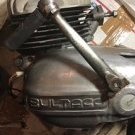
June 23, 20206 yr hi I purchased 163 short block The crank is it 60 or 64 stroke .so I find right cylinder
June 23, 20206 yr I think they are a 60mm stroke but I don`t know for certain. I can`t find any specifications online. I know the MK11 250 Pursangs changed to a 64mm stroke but they were a couple of years after the M163. I`m pretty sure the MK 10 and the MK 9 250 Pursangs were a 60mm stroke.
June 23, 20206 yr Author Hi thanks reply . ,,, I looked up gaskets kits , from Hughes bultaco and ebay ,, from model 135 pursang to 163 Astro 250 engine it said gaskets same so figure must be 60 stroke so I ordered gasket kit and now find parts in my basket cases and boxes ,,,, ?.... I sincerely hope to find a cylinder in my pile ,, of parts ,,,,, , Wednesday I started pulling parts off ,I have pursang 192 For a few parts , still looking for cylinder piston ,head I know must have parts off few 250 , I tore down years ago , Edited June 25, 20206 yr by larry s. k. More info
June 24, 20206 yr The Weavers would be the shop to ask about specs for the Astros. We are waiting on a pile of parts from them for a 250 M195 Astro to get that bike up and running again. Mainly an original front hub and spokes. I hope it all goes well fr you. Graham.


Join the conversation
You can post now and register later. If you have an account, sign in now to post with your account.