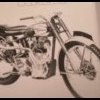
July 6, 20206 yr Hi Guys sorry bit going off topic. i am interested to know what are those forks.? i once own DOT .. but they are different , what are model of those and where i can get them ? Regards
July 9, 20206 yr Author hi faussy. thanks good findings interesting i dont have relation with that gentleman i m high motivated average enthusiasts mr hitchcock have lot of bobs i just. finished 1955 Enfield trials i have crusader frame thought if can get engine and forks i can build prototype replica
July 10, 20206 yr The leading link forks fitted to your Starmaker engined Royal Enfield are called 'Earles type' lots about them here http://www.vk6fh.com/vk6fh/earlesfork.htm
July 10, 20206 yr Author Thanks "Trials are fun" do you think they can build locally ? use the some spares from other forks links etc ? Edited July 10, 20206 yr by bsa4life
July 10, 20206 yr On 7/6/2020 at 7:59 PM, bsa4life said: Hi Guys sorry bit going off topic. i am interested to know what are those forks.? i once own DOT .. but they are different , what are model of those and where i can get them ? Regards Going slightly off topic the exhaust system is a Mayfield expansion chamber. Back to the forks which are actually leading link not Earles type, if you are considering getting some leading link forks made then best to contact a frame builder, maybe look in Old Bike Mart Edited July 10, 20206 yr by trialsrfun


Join the conversation
You can post now and register later. If you have an account, sign in now to post with your account.