May 1, 200620 yr does anyone know if the montesa 248 yokes, forks and front wheel will fit onto my 349? also anyone know where i can source an air box for it? i have just picked a 349 with gray mudguards up and the yokkes are wrong and front wheel. Cheers James
May 1, 200620 yr does anyone know if the montesa 248 yokes, forks and front wheel will fit onto my 349?also anyone know where i can source an air box for it? i have just picked a 349 with gray mudguards up and the yokkes are wrong and front wheel. Cheers James <{POST_SNAPBACK}> dude...what in gods name is a 349?????
May 2, 200620 yr Hi James I suggest you might get more response if you post your 349 queries in the twinshock forum. I would say it is very likely that the 248 front end would fit your 349 provided you use an axle length and wheel that matches the width of the fork tube spacing of whatever clamps you use. David
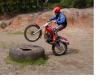
May 18, 200620 yr James Hey we have a montesa cota 349 and have had it a few years. Just out of curiosity how much are they worth at the moment? Sandifords have always supplied us with all the parts we have needed for ours. James Attached is a picture of ours Edited May 18, 200620 yr by betatrials99


Join the conversation
You can post now and register later. If you have an account, sign in now to post with your account.