Skip to content
View in the app

A better way to browse. Learn more.

Trials Central

A full-screen app on your home screen with push notifications, badges and more.

To install this app on iOS and iPadOS
  1. Tap the Share icon in Safari
  2. Scroll the menu and tap Add to Home Screen.
  3. Tap Add in the top-right corner.
To install this app on Android
  1. Tap the 3-dot menu (⋮) in the top-right corner of the browser.
  2. Tap Add to Home screen or Install app.
  3. Confirm by tapping Install.

riddler990

Members
  • Joined

  • Last visited

Everything posted by riddler990

  1. riddler990 replied to bbk's topic in Vertigo
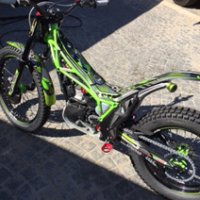
    A place called "wagon wheel" Near Ridgecrest Ca.
  2. riddler990 replied to bbk's topic in Vertigo
    Here's one for ya. '17 250 camo
  3. Harry, Give this a try, I've got a problem with my fan coming on as well, and can reproduce it, but haven't dug in far enough to find the cause. Here's the scenario: with the headlight switch in the on position, fan will not work. as soon as the headlight switch is pushed off, fan will come on as normal. lighting circuit interfering with the fan circuit, but how and why? try this with yours and see if there's an issue. And if anyone has any ideas as to my problem, I'm all ears.
Account

Navigation

Search

Search

Configure browser push notifications

Chrome (Android)
  1. Tap the lock icon next to the address bar.
  2. Tap Permissions → Notifications.
  3. Adjust your preference.
Chrome (Desktop)
  1. Click the padlock icon in the address bar.
  2. Select Site settings.
  3. Find Notifications and adjust your preference.