Perix
Members
-
Joined
-
Last visited
Everything posted by Perix
-
I checked earlier manuals and it seems that they changed the way of measurement from 2018.
-
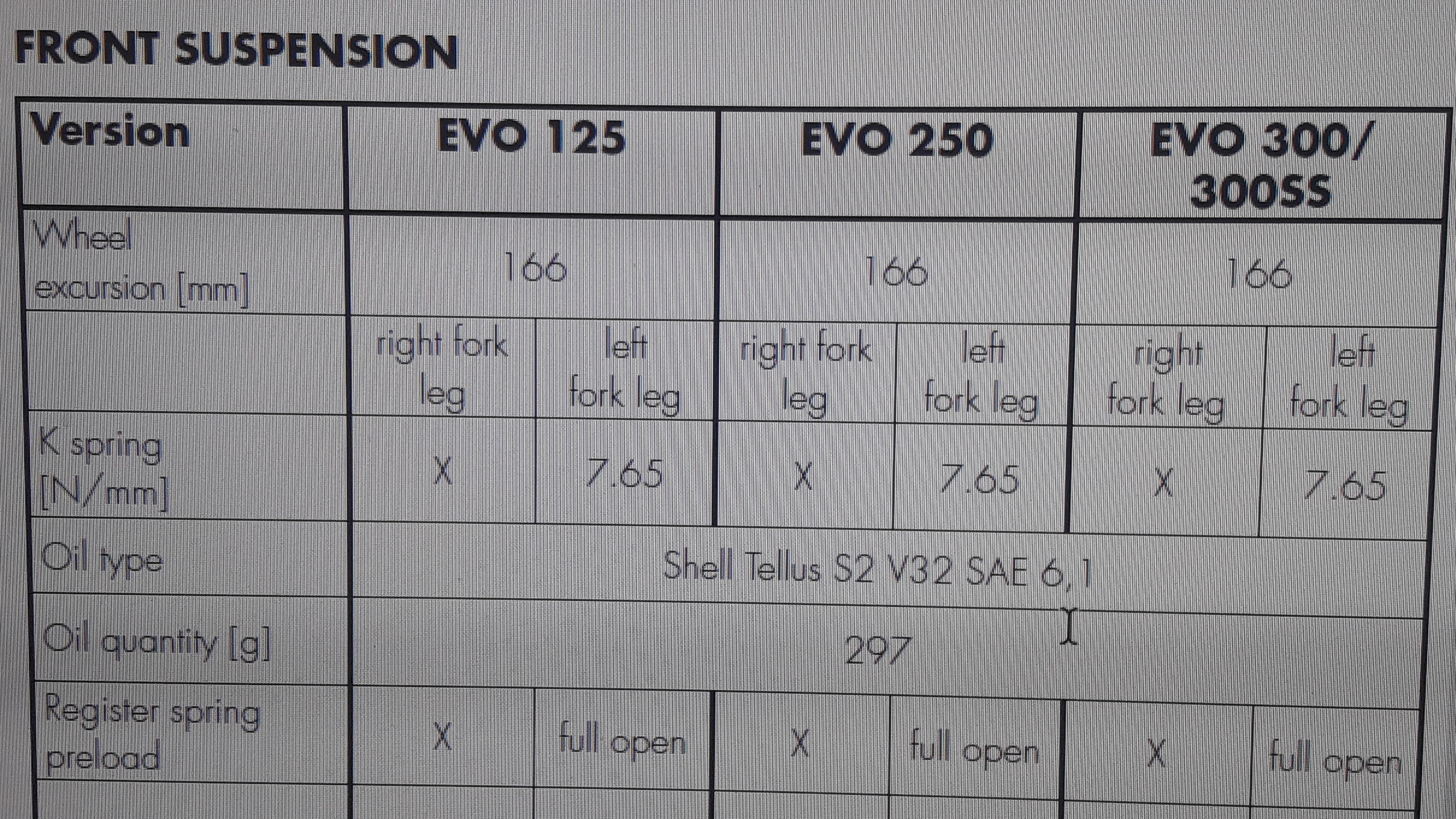
Thanks for your reply, this is the 2018 manual

-
dear friends' 1. how often do you cange the fork oil? 2. what kind of oil is the best. the manual says sae 6.1 but i found sae 5w 100 % syntetic is it ok? 3. what quantity you use? i have seen earlyer post that pepole wrote specific quantity for every leg in cc but in my manual its says 297 g. can anyone approve that. 4. any good tips you can give for the first time that i am trying to replace the fork oil? appreciate your help...thanks
-
Hi, from my experience it was the same size. I had airoh twist size medium with my enduro bike and now i use airoh ttr size medium with my trial bike. Don't know about you but its work for me
-
Dan, thanks for your help. I will give it a try
-
Dear friends, i have evo 250 2018 i think my front fork ain't compressed enough when i am standing on the bike. I am 70 kg and after few megerment that i made it seems that the fork compressed down about 4 cm. I saw some videos that said it should be 6-8 cm. I try to change the clicks on the fork and it didnt make any difference. Need your help to understand what is wrong... Thanks