Alexle
Members
-
Joined
-
Last visited
-
Wondering if anyone else has tried a high compression insert on a 250 vertigo?
-
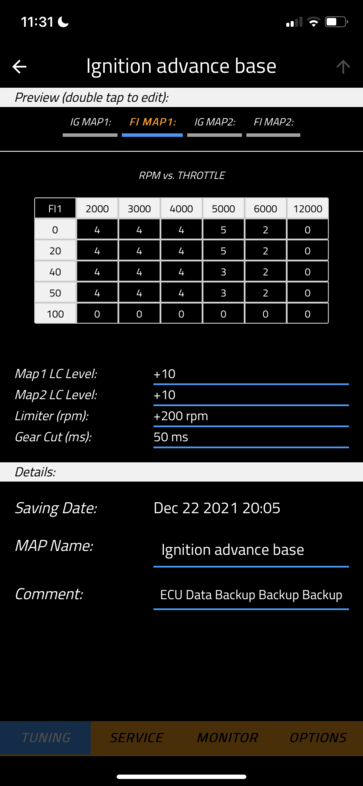
Oh and my fuel mapping is as follows in case there's interest.
-
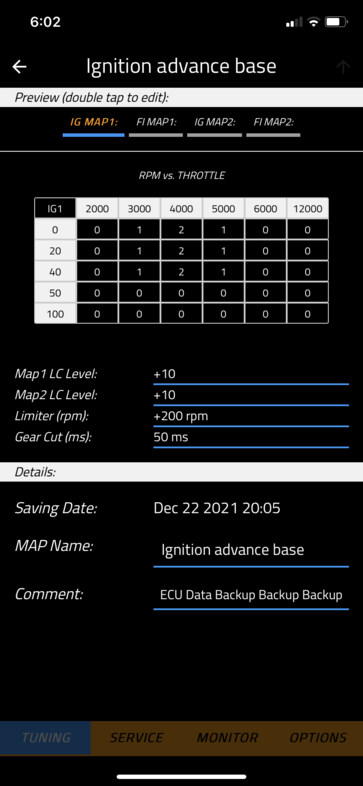
Yes the good part about the vertigo ignition timing is you can choose what rpm vs throttle opening you want to advance or retard timing. The software allows you to manipulate the factory map within a certain threshold but it doesn't allow you to change the map fully. This is the settings I've been playing around with. Which seems to make it feel a bit more snappy. Although I'm really just doing trial and error so if anyone has any suggestions, I'm all ears.
-
I actually have a extra quick turn throttle already. Modified a fast throttle to make the pull more at the beginning. I want it to be faster off the bottom, I guess spin up faster.
-
Hi I have a vertigo nitro 250. I stepped down from a 280 trs and found the bottom end to be a bit too soft for my liking. I have been playing around with the get ecu tuning, more fueling off the bottom seem to help a bit but I'd like a bit more power. I'm wondering if advancing the ignition timing off the bottom would help? But I'm worried about messing with it too much. Other alternatives I'm assuming could be adding a high compression head? Has anyone tired this? Hoping to get some suggestions. Thanks!
-
Hi I just purchased a nitro 250. Wondering if there's a manual for that yet? If not a r3 manual would suffice! Thanks in advance! Le.alex.x@gmail.com