Branny
Members
-
Joined
-
Last visited
-
Thank you all for reply’s will give it all good going through this weekend
-
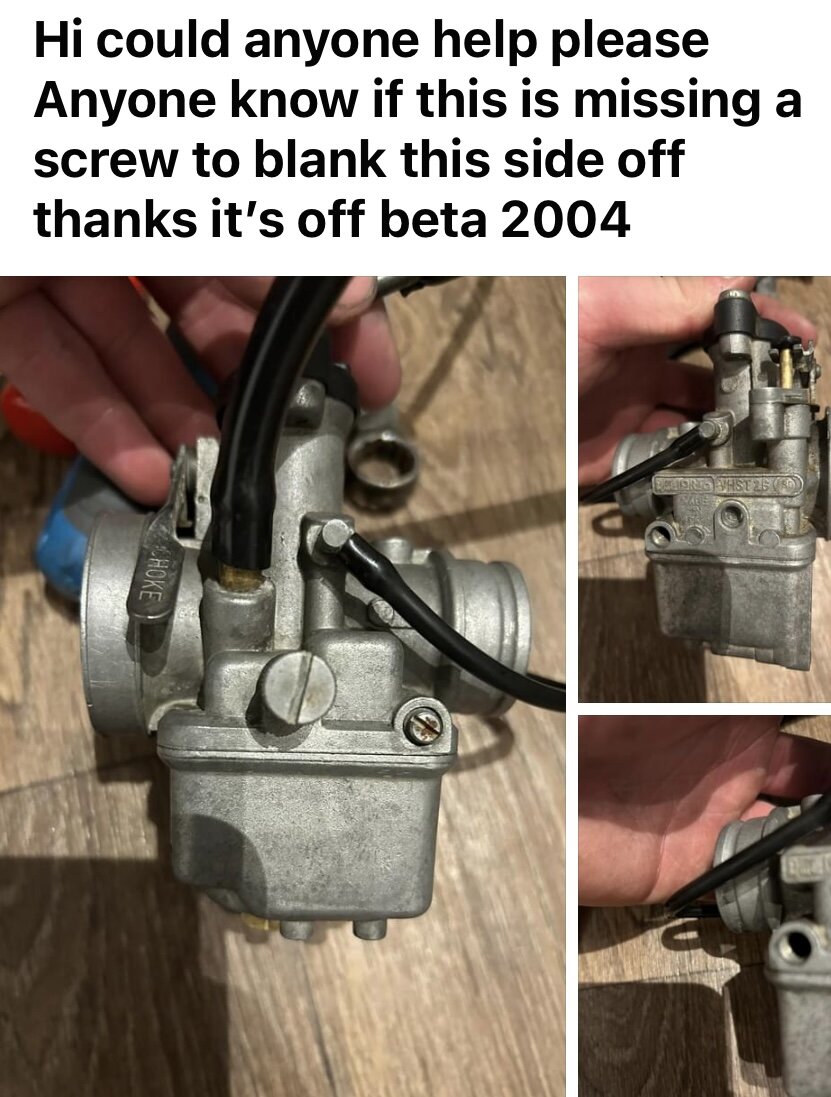
Hi thanks for reply I did search the internet and said was stock carb ? I’ve cleaned the carb throttle nice responsive everything working good nice and clean now just unsure if there is ment to be screw in the hole with threads thanks and the vent line has hole cut
-
Hi thanks for reply I did search the internet and said was stock carb ? I’ve cleaned the carb throttle nice responsive everything working good nice and clean now just unsure if there is ment to be screw in the hole with threads thanks
-
Will check these things thanksOkay will try new seal thanks palHi just wondering if anyone can help I have a beta 125 2004 trials I went out today and revs stuck on full and I pulled kill switch no joy still didn’t cut out so had to put ht cap off checked carb and throttle in fine not stuck not nicks in cable slider hits bottom carb fine soon as I start it just revs up full any ideas thanksBranny joined the communityHi just wondering if anyone can help I have a beta 125 2004 trials I went out today and revs stuck on full and I pulled kill switch no joy still didn’t cut out so had to put ht cap off checked carb and throttle in fine not stuck not nicks in cable slider hits bottom carb fine soon as I start it just revs up full any ideas thanks