Skip to content
View in the app

A better way to browse. Learn more.

Trials Central

A full-screen app on your home screen with push notifications, badges and more.

To install this app on iOS and iPadOS
  1. Tap the Share icon in Safari
  2. Scroll the menu and tap Add to Home Screen.
  3. Tap Add in the top-right corner.
To install this app on Android
  1. Tap the 3-dot menu (⋮) in the top-right corner of the browser.
  2. Tap Add to Home screen or Install app.
  3. Confirm by tapping Install.

No Stop = 5?

Featured Replies

So every section must be capable of being cleaned then?

Perhaps we should ask the organisers to make a new rule.... If a section doesn't have at least one genuine clean in an event, that section will be deemed as too hard and be scrapped from the results! ;)

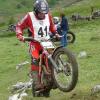
Dont worry! it seems to be happen everywhere. Tony Calverts only dab of the pre65 this year was a very obvious stop. but this is down to the observers discretion on the mark given. as long as everyone gets treated the same then it isn't that important really. just spoils it a little when you have a good no stop clean and someone gets away with stopping and starting for clean too.


Join the conversation

You can post now and register later. If you have an account, sign in now to post with your account.

Guest
Reply to this topic...

Account

Navigation

Search

Search

Configure browser push notifications

Chrome (Android)
  1. Tap the lock icon next to the address bar.
  2. Tap Permissions → Notifications.
  3. Adjust your preference.
Chrome (Desktop)
  1. Click the padlock icon in the address bar.
  2. Select Site settings.
  3. Find Notifications and adjust your preference.