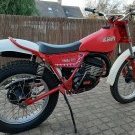
July 16, 200818 yr Hello, I bought 2 Fantic bikes this spring. My Fantic 301 progress 2 (1986) is very strong and complete, and did well in Classic-competition. My Fantic 240 (1983/84?) runs very smooth. I had the carburator cleaned ultrasonic and ordered new carburatorseals from dellorto.co.uk. The rest is a straight forward job (frontforkseals, new tires and oil, and some new rubbers). I will be using it next year in Classic competion I'm still looking to buy a spare engine cover for my Fantic 240, for the righthand side. Can anyone help me with this? Kind regards, Arie from Holland. Righthand side cover My Fantic 240 My Fantic 301 (a bit dirty after practice)
July 16, 200818 yr Try Bob Wright, heres his website address. http://www.r2wtrials.co.uk/html_files/fantic.html
July 16, 200818 yr Author Thanks for your info. I did mail Bob some week ago, no reply so far. Kind regards.
July 17, 200818 yr Hi Arie, thanks for the PM. I have no more 240 engine parts as I only have the later type motors 241/
July 17, 200818 yr Author Hello Lee, Thanks for your reply, and your help is much appreciated. Kind regards
July 17, 200818 yr Author Thanks Dabnabit, I moticed the post yesterday and contacted the seller by mail. He wasn't offering a flywheelcover, but was willing to check his parts anyway. The only cover he found was a cover badly damaged when the chain came off. That one I let go.


Join the conversation
You can post now and register later. If you have an account, sign in now to post with your account.