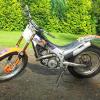
October 16, 201214 yr can anyone tell me where the speedo pick up is on this bike ,I've had a look but cant see anything,
October 16, 201214 yr number 45 here on the front axle. http://www.haventrialsport.co.uk/index.php/1999-frame-c-171_185_187 They were often removed and a spacer fitted when the speedo was removed.
October 16, 201214 yr Author number 45 here on the front axle. http://www.haventria...e-c-171_185_187 They were often removed and a spacer fitted when the speedo was removed. thats different from mine ,mine has the electronic speedo in the tank cover
October 16, 201214 yr Pickup was a magnet on the rear wheel. From memory it was a Cateye speedo, or at least looked just like one. They didn't work very well as the ignition system would interfear with them, but they worked well when the engine was off.
October 17, 201214 yr The line went with the brake line to almost the caliper. Had a pickup on the spokes. Not worth fixing . Find a newer bike speedometer that might last a little longer.
October 17, 201214 yr Author thanks guys,it looks like some one has ripped it off anyway, I just wanted to keep the speedo in the tank cover ,so I'll see if I can find something more reliable that will fit the hole in the tank cover.
October 17, 201214 yr I need some glasses! I read (and found) 1999 Techno, not 1996, sorry. Yes, the earlier models had a pick up off the rear wheel.


Join the conversation
You can post now and register later. If you have an account, sign in now to post with your account.