March 7, 200620 yr Any one seen or think it would look good A Montesa 315r red one 2001,02, or 03 With repsol rims on it James
March 7, 200620 yr I agree being the proud owner of a 2003 315R it would be criminal to paint the wheels orange
March 7, 200620 yr Author i personally like the rims on the 4rt just wondering if they will look nice on a late montesa 315.
March 7, 200620 yr If you are going down that road, i'd get the rimms done in black, orange looks a bit out of place .... Orange hubs perhaps ... if you have got the repsol sticker kit,,
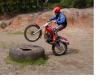
March 7, 200620 yr Orange sucks, black is the new orange!! SEE! Edited March 7, 200620 yr by monty-python
March 7, 200620 yr Now you are talking, that looks the dogs danglers .... Black is the way to got without a doubt, 140 quid, returned within a week from Candy Wheels ... Nice
March 7, 200620 yr How are your wheels holdin up monty, you had had them on for a while now !, do they mark easily when changing tyres ? fulls of nasty marks off rocks ?
March 7, 200620 yr Nice monty got to say i like the black wheels think im getting my gasser done when i get chance.
March 8, 200620 yr So far they are holding up fine, but saying that, i havn't done any rocky trials yet. In fact it has hardly moved at all, one trial, couple of practices. There is astill snow lying up here!! As for tyre changes, i havn't done any yet!! Edited March 8, 200620 yr by monty-python
March 20, 200620 yr get some orange rims with a polished edge. with black spokes and nipples. and also an orange hub, seen a 4rt with this on sunday, and it looks immense!


Join the conversation
You can post now and register later. If you have an account, sign in now to post with your account.