

Skip to content
View in the app

A better way to browse. Learn more.

Trials Central

A full-screen app on your home screen with push notifications, badges and more.

To install this app on iOS and iPadOS
  1. Tap the Share icon in Safari
  2. Scroll the menu and tap Add to Home Screen.
  3. Tap Add in the top-right corner.
To install this app on Android
  1. Tap the 3-dot menu (⋮) in the top-right corner of the browser.
  2. Tap Add to Home screen or Install app.
  3. Confirm by tapping Install.

ccmtrials

Members
  • Joined

  • Last visited

  1. Jay did you sell the bike, if not i have 4 kick start shafts and other parts if you need drop me a line paulnixon@ntlworld.com
  2. ccmtrials replied to not ron's topic in Honda
  3. ccmtrials replied to ccmtrials's topic in Twinshock
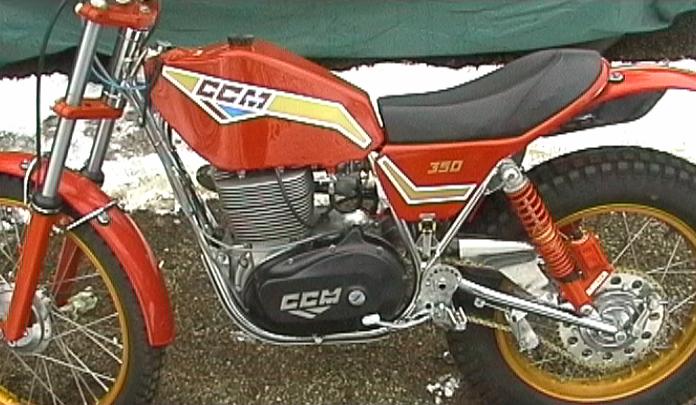
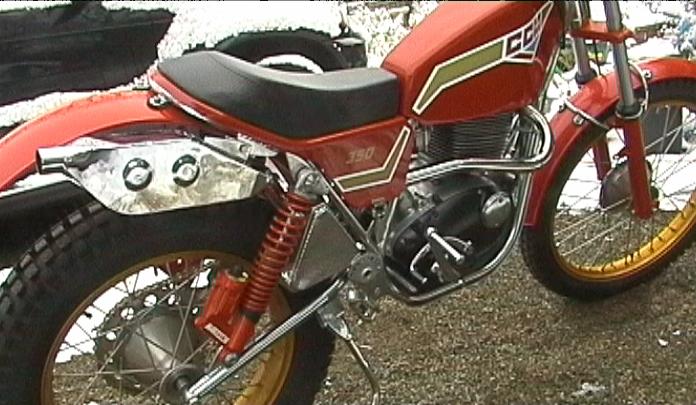
    this bike has never been used, its brand new, i do have another which i ride after much modification and its ok but does'nt realy plonk like i thought it should, it over square more suited to reving so its rides differently thats for sure. Anyhow i am a bit of nut for these bikes, i am looking for anyone with information / parts /bikes or just interested in the bike to speak with cheers
  4. ccmtrials posted a topic in Twinshock
    Hi Just thought i would post a quick note to see if there are any other CCM tr 350 owners out there or other like minded CCM fans please drop me a line
Account

Navigation

Search

Search

Configure browser push notifications

Chrome (Android)
  1. Tap the lock icon next to the address bar.
  2. Tap Permissions → Notifications.
  3. Adjust your preference.
Chrome (Desktop)
  1. Click the padlock icon in the address bar.
  2. Select Site settings.
  3. Find Notifications and adjust your preference.
