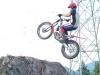
July 31, 200818 yr Hey everyone. My buddy is looking at getting this bike. Who knows about these years? I'm pretty sure it's an 98. The motor feels really strong. Anything to watch out for on this bike? Any thoughts would be good!! Thanks
July 31, 200818 yr Might want to ask this in the GasGas forum as posting this here is like waking into a kennel with a pork chop tied around your neck. Having said that look for the usual stuff with any newer bike like frame fractures near the high stress areas like the head stock and any fractures in the engine cases from missed starts. Nicks in fork tubes, funny engine noises, oddness in the suspension. Barring that this is about the time that GasGas started to really improve their reliability and it does look in pretty decent shape Edited July 31, 200818 yr by Dan Williams
July 31, 200818 yr Hey everyone. My buddy is looking at getting this bike. Who knows about these years? I'm pretty sure it's an 98. The motor feels really strong. Anything to watch out for on this bike? Any thoughts would be good!! Thanks I'm guessing it's a 98' TX270 and the VIN number starts with "VTRGG27098-----------". Jon, "Hey! That's no porkchop, that's my leg!"
July 31, 200818 yr Author Oops, my bad. I have a beta, thats why my brain sent me there. Shoot. Sorry boys!!
July 31, 200818 yr i had a TX200 and that was the most reliable bike i have ever had. this is the first modle to have the ally tank with they carried on making until 2001.


Join the conversation
You can post now and register later. If you have an account, sign in now to post with your account.