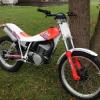
October 4, 201511 yr Just bought my first trials bike, a 1990 Fantic 247 (w/ 305 graphics) converted to twin shock. Another forum member (forgot who) did the work a few years back, I just picked it up from my local trials shop. Converted to run a local air cooled / drum / conventional fork / twin shock class. I'm in the central New York area. Having fun putting around my backyard. Going to attend events next season. Let me know if you're in the area! Edited October 4, 201511 yr by sgtrials
October 4, 201511 yr We have a trials club in central ny.Our web site http://3dtrials.org So check it out and welcome to trials. JR
October 4, 201511 yr Welcome to trials!!!.Check out MillerRanchTrials.com. We have Our next event October 18th in Corning N.y. it's a gate style trials so that means no forced lines, you can ride what you feel comfortable with as long as you hit the start and finish gates. We are very welcoming to new riders and everybody is very eager to help new riders out.Your Fantic has ridden here many times b4!
October 4, 201511 yr Check out www.newyorkaircooledtrials.com. Another gate style trials where you are free to choose you path through each section. Their last meet of the year is scheduled for October 25 at Apalachin NY.
October 5, 201511 yr Author Thanks guys! Going to check out those websites and try to attend both those events


Join the conversation
You can post now and register later. If you have an account, sign in now to post with your account.