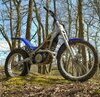
March 10, 20215 yr Hi everyone, I recently picked up a Sherco 03 series 250 as my first bike It needs some work... The rubber between carb and airbox perished Airbox is filled with gunk Rear mudguard is very broken Rear brake sticks Any additional tips and advice would be greatly appreciated. I will be posting about individual issues in the main forum. Looking forward to being part of this community Edited March 10, 20215 yr by PoppinWhoolies
March 10, 20215 yr Author 1 hour ago, wobblenorbed said: Try Splat Shop Just picked up everything I need from Splat Shop and it arrived in 2 days! They are great
March 11, 20215 yr Author 4 hours ago, turbofurball said: So are your whoolies now dank? Moto whoolies need work This is my first motorbike and I want to get it running well before I ride it hard. It is currently in many pieces being cleaned and rebuilt. Hopefully the MTB whoolies will help the process
March 12, 20215 yr They do, kinda. Funnily enough when I was struggling with making turns on steep slopes at low speeds for trials I went out on my old MTB and practiced the same movements a few times and it really helped wrap my head around which way the bike pulls as you turn and where to put your body.


Join the conversation
You can post now and register later. If you have an account, sign in now to post with your account.