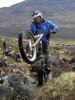
March 15, 200917 yr As it says, took some vids of ross riding after the north berks trial today, very impressive Click me
March 18, 200917 yr Poetry in motion Talented rider obviously but he spends most of the time balancing with the clutch in, hows that poetry in motion ???? I think unless the section is timed as at world and British Champ level then we are going to see lots of queues this year.
March 19, 200917 yr Talented rider obviously but he spends most of the time balancing with the clutch in, hows that poetry in motion ????I think unless the section is timed as at world and British Champ level then we are going to see lots of queues this year. Queues?!! :angry:they just start arguements. Edited March 19, 200917 yr by HAM2
March 20, 200917 yr Talented rider obviously but he spends most of the time balancing with the clutch in, hows that poetry in motion ???? Its hardly suprising if hes not against the clock! they all do that but when he does go up the steps, its as smooth as silk. I don't know of any other rider who rides like this. There are better riders of course, but to watch Ross when he is at his best is just awesome. My favourtite rider by far of the modern era


Join the conversation
You can post now and register later. If you have an account, sign in now to post with your account.