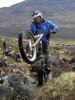
May 15, 200917 yr My efforts from later on in the week after I retired Here you go They are not as good as andy or slapshot but then again I can't say photography is that high on my list of interests and my camera only cost Edited May 15, 200917 yr by thespikeyone
May 16, 200917 yr Lots of good shots, gives a good feel to the sections! Better cameras even take a lot of bad pics sometimes! Nothing wrong with yours, good job! Let's see the vid ov Doug!!
May 16, 200917 yr All credit to the organisers and observers at this years ssdt but I think the guys behind the cameras deserve special praise. In the spikeyones photos theres another shot of me with my feet up, this is not the first and i'm even on video cleaning a section. When you consider how many marks I lost they were very good at pressing the shutter !! cheers ps I dont mean the one when I'm on the road Edited May 16, 200917 yr by Baldilocks
May 19, 200917 yr Some good shots in there young Mr Milligan. Just before his 5...you can't tell he was trying can you???? Edited May 19, 200917 yr by Slapshot 3


Join the conversation
You can post now and register later. If you have an account, sign in now to post with your account.