February 2, 201214 yr Hi Guy's, Hi OTF Agree totaly with wht you say. :thumbup: Go on then build one up! you now you want too :banana2: Regards Charlie.
February 2, 201214 yr Hi Guy's, Hi OTF Agree totaly with wht you say. :thumbup: Go on then build one up! you now you want too :banana2: Regards Charlie. I do but nobodys buying anything at the moment so i'm skint very skint.
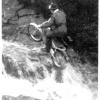
February 2, 201214 yr Hi all I am glad that there is so much interest in my tricked up Ariel I suppose the reason that the bike is in its present guise is the fact it gets ridden at least three weekends every month in competition, mostly in modern trials against modern bikes with tight sections and in most cases comes out on top, yes its a replica frame but engine (500 longstroke) and gearbox are genuine Ariel as well as all the other parts which are pre 65 legal as opposed to the Cub seen on Sunday with a modern carb, I would imagine most of the other bikes are not worked as hard as mine and have already been returned to their sheds ready for next year!
February 2, 201214 yr Author Interesting method for jacking the back end up. And shortening the wheelbase.
February 3, 201214 yr and thus ineligble for the Scottish.. Do you think he's bothered seeing as he rides it most weekends anyway? Why build a bike just for one event a year that you might not get an entry into, unless youire a previous winner, that would be daft wouldnt it?
February 4, 201214 yr I was lucky enough to ride the pre 65 Scottish twice, 2009 and 2010 on this bike and finished mid table but would have really struggled on the rocks with real pre 65 forks! (not that i didnt struggle)


Join the conversation
You can post now and register later. If you have an account, sign in now to post with your account.